The prompt
The prompt
← Documentation · Previous: Story and world · Next: Models and parameters
Every request is rebuilt from scratch, from your documents, every single time.
Nothing is remembered between requests. There is no accumulated conversation object, no hidden history, no state that drifted three hours ago. If you edit a scene, change your persona or switch a lore entry off, the very next reply is built from the new version — without touching a word of what has already been written.
That one rule is why edit, regenerate and replay-from-here are not special cases in this app: they all go down exactly the same road as a fresh send.
What goes on the wire
One system message, then the chapter’s messages, then your new line — and, when a lore entry
fired on a keyword, one more short system message after all of it.
The first system message is assembled in this order:
| # | Block | When |
|---|---|---|
| 1 | Mode preamble — the narrator instruction, or the role-play instruction followed by “You are playing X and Y” (or “X, and nobody else”) and each character’s description | always |
| 2 | Persona — “The user plays name: description” | when you have set one |
| 3 | The story so far | when it is not empty |
| 4 | World, always on — the lore entries marked always on | when you have any |
| 5 | This chapter — “Chapter n, title. The scene:” then the scene, verbatim | always |
| 6 | Style rules — dialogue, reply length, stay in character, never write for the persona | always |
| 7 | Author — how to read a direction, and that it outranks everything above | when the chapter carries one |
And after everything, past your own new line, the eighth:
| # | Block | When |
|---|---|---|
| 8 | World, as it came up — the entries a keyword fired | when any fired this turn |
Both send the same sentence — What is true in this world: and a line per entry — and the preview names them apart because they behave apart. An always-on entry is on for the whole chapter, so it can sit near the front without ever moving anything. A keyed entry fires when its word is in the scan window and stops when the word slides out of it — which is a block that comes and goes, and a block that comes and goes at the front of the prompt changes the prompt from its very first byte. Last, it changes nothing in front of it. Why that matters is below.
So if you type a word an entry is keyed on and the World, always on block does not change, that is right: look at Lore, which names every entry that fired and on which word, and at World, as it came up at the foot of the sheet.
The order is not arbitrary. The mode preamble sits first because it is the standing instruction everything else qualifies, and the style rules sit last because the instruction closest to the conversation is the one a model holds onto — with the author’s block after even those, because it outranks them. The four blocks in the middle describe the story, and those you can put in any order you like — see Changing the order.
None of those blocks says which person the story is written in. That is not an omission: a model takes the frame from the prose it is given, and the blocks above are where you say so if you want to say it outright — see Voice, and why there is no switch for it.
Then the chapter’s messages, oldest first — and only this chapter’s. Earlier chapters reach the model through block 3 and nowhere else. That is the whole point of chapters.
One thing can sit between those messages: when a role-play story is cast
one character at a time, a short system line marks each point where the
cast changed — who the model plays from here, and who has left or joined. Nothing above it is
touched.
Author
A message can carry a direction: the author speaking about the story rather than the persona speaking in it. Writing one is in Reading and writing; this is what it does to the request.
The direction goes out with your message, after the prose and a blank line:
Mara pushes the door open.

[Author: The room is empty, and it should not be.]
A message that is nothing but a direction sends the bracketed line alone. Either way it is one message, so the budget keeps a turn and its direction together or drops them together.
The moment a chapter has one in it, a seventh block joins the system message:
Some of the user’s messages carry a direction from the author, marked
[Author: …]. These are instructions about where the story goes, not part of the story. Follow them exactly and without acknowledging them. They override every other instruction above.
That block cannot be argued with. Its words are fixed and not editable. It has no handle in the preview, so reordering can never move it off the end. The narrator override does not replace it, and there is no setting that turns it off. A direction is the author’s, and the app does not get a vote.
A direction stays in the chapter. The storm arrives tonight is still in the history three messages later, because that is how long it takes for a storm to arrive.
A direction is not part of the story. Closing a chapter sends the prose and not the directions, and a message that was only a direction is not in the summary at all. The keyword scan behind lore does not read them either — an entry keyed on storm fires when the story mentions a storm, not when you ask for one.
The context budget
Before sending, the app adds up the system message, the history and a reserve for the reply, and compares it to Max context tokens in Parameters.
If it does not fit, the oldest messages are dropped first until it does. The system message is never trimmed — the scene, the persona and the world are what keep the story coherent, so they stay and the transcript gives way.
They are dropped a block at a time, not one at a time: when the chapter first outgrows the budget the window gives up its oldest four turns and then stays where it is, for as long as what is left keeps fitting. One at a time would drop exactly one more message every turn for the rest of the chapter, so no two requests in a row would ever begin the same way — see below.
This is never silent. The composer says 3 older messages left out when it happens, whether or not developer mode is on, and it is the signal that the chapter has run long enough to close.
Token counts before sending are an estimate (characters ÷ 3.6). Exact counting is provider-specific and not worth a 400 kB dependency to be approximately as wrong. After each reply the app shows the provider’s real usage under the answer, so you can calibrate the budget against what you are actually billed.
What it costs to send it all again
Sending the whole prompt every time sounds expensive, and it would be if every provider read it from scratch every time. Almost none of them do.
Every provider worth naming keeps a prefix cache: the leading bytes of a prompt it has already processed cost a fraction of the full rate — often a tenth, sometimes nothing — on the next request that opens with exactly those bytes. A chapter that grows a turn at a time is the best possible shape for that, because each request is the last one with two more messages on the end. Nothing has to be remembered between requests for this to work; the provider is recognising bytes, not keeping a session.
What breaks it is anything that rewrites the front of the prompt, and Lamplit is careful not to:
- Keyed lore goes last, after your message, so an entry firing or falling silent never touches the blocks in front of the chapter.
- The history window moves in blocks, so a chapter over budget keeps the same opening for many turns instead of shedding one message every turn.
- Claude models reached through an aggregator are sent the two cache markers they need — one at the end of the system message, one at the end of the history — because those models cache only where the request asks them to. Everything else caches on its own, or does not cache at all, and is sent exactly what it has always been sent. If an endpoint refuses the markers, the same turn is sent again without them.
You can see whether it worked. With Show token counts on, the footer under a reply says
8.0k in · 240 out · 7.6k cached — that last number is how much of the prompt the provider did not
have to read again. It is absent when the provider does not report one, which is most local servers
and a few hosted ones. A second turn in the same chapter that still says nothing about caching means
you are paying full price for the whole chapter, every turn.
Two things worth knowing before you count on it:
- Anthropic’s own endpoint does not cache at all from here.
api.anthropic.com/v1is their OpenAI compatibility layer, and prompt caching is one of the things that layer does not support. To cache a Claude model, reach it through NanoGPT or OpenRouter. - Caching is not free money. Writing a prefix into the cache costs a little more than reading it fresh on some providers. Two requests over one prefix pay that back; one does not. Which is another way of saying that this is worth most on a long chapter and nothing at all on a chapter you abandon after a turn.
Looking at it
The preview is behind Developer mode: open Preferences → Advanced and switch it on. A
context pill appears under the composer — context 805 / 16k, what the next request will
carry against your budget — and clicking it opens the prompt.
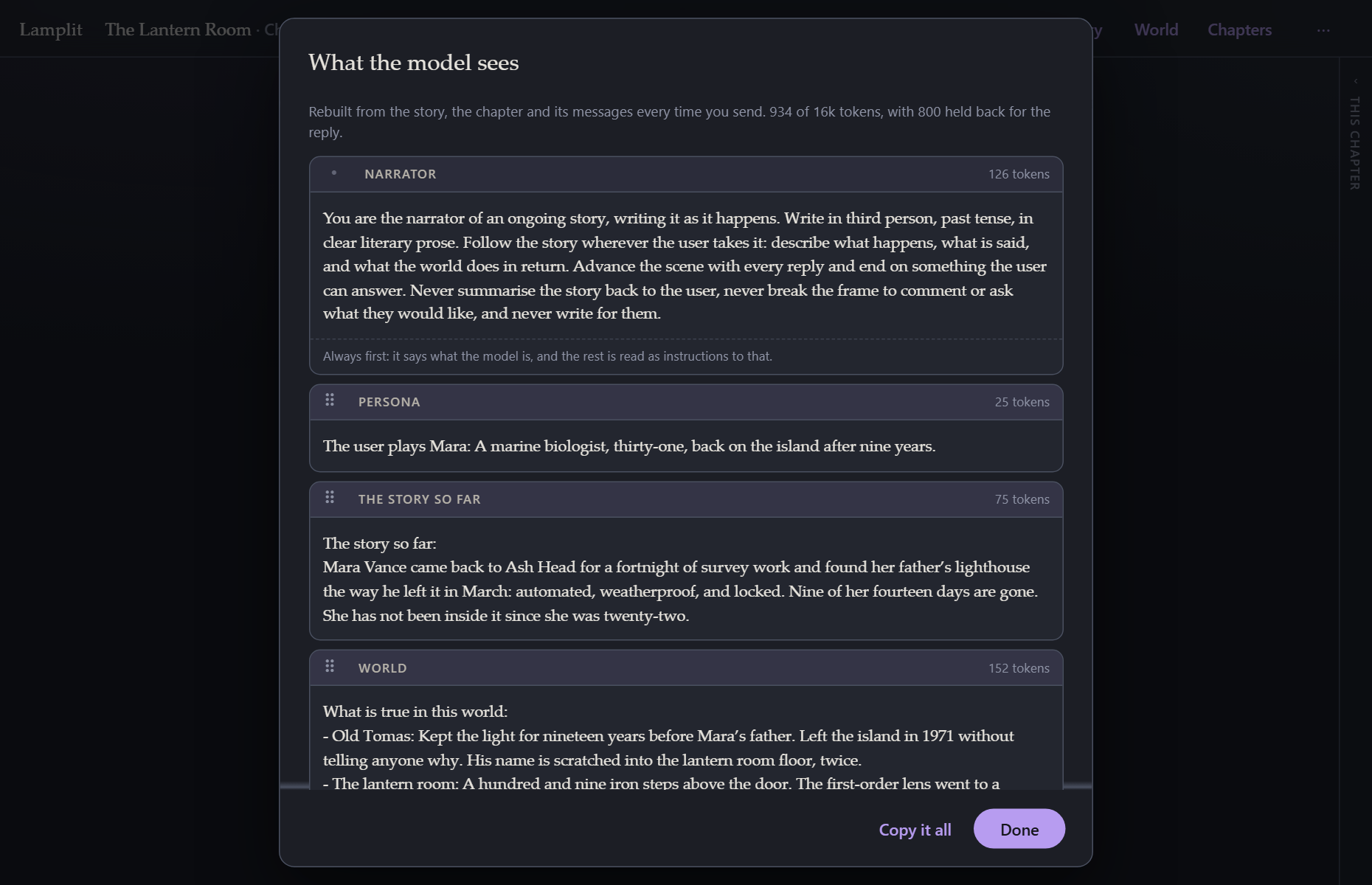
Every block, in order, with what it costs. At the top: the total, the budget, and how much is being held back for the reply.
For lore, it also says which entries fired and on which key — fired on “keeper” in the scene — which is the fastest way to work out why an entry did or did not turn up.
Copy it all puts the whole assembled prompt on your clipboard, which is handy for pasting into another tool to compare, or into a bug report.
If you have typed something in the composer, the preview includes it. The pill is live: it updates as you type, so you can see a long message pushing you toward the budget before you send it.
Changing the order
Models differ in what they weigh. If you have read the preview and think this one would do better with the scene before the world, drag it there: each of the four middle blocks has a handle, and the sheet rebuilds as they move, so you can see the effect before anything is sent. The arrow keys do the same to a block whose handle has the focus.
Three blocks have no handle. The mode preamble is always first — it says what the model is, and everything after it is read as instructions to that. The style rules are always last, for the same reason in reverse: the instruction closest to the conversation is the one that sticks. And after those, when there is one, the author’s block, which outranks every instruction above it and so has none put after it. Each says so in the sheet.
And one block is not in the order at all: the entries a keyword fired, which go after your own message rather than into the system message, and so have no slot to be dragged into. The author’s block still has the last word — world facts are not instructions, and nothing there argues with a direction.
The order belongs to the story, not to the app: it is a judgement about this story and the model behind it, so another story is unaffected and a duplicate carries it along. Reset the order appears once you have changed something, and puts it back to the order Lamplit ships with.
Only a changed order is written down, and only an order this version can make sense of is used. A story written before this feature existed opens in the shipped order, and a
promptOrderthat names a block this build does not have falls back to it rather than guessing.
The summary request
Closing a chapter uses a different prompt, built the same way: the story so far as it stands, the chapter’s scene, everything written in the chapter, and then the fold-in instruction. It asks for the whole summary back rather than an addition, which is what keeps the story so far one page instead of a growing pile.
That instruction is editable per story, from the review sheet or from World → How a chapter is folded in.