Models and parameters
Models and parameters
← Documentation · Previous: The prompt · Next: Your data
Both halves of this page are one sheet in the app. The model name in the top bar opens Model,
which has two tabs: Connection — where the story is sent — and Parameters — how the model
is asked to write once it gets there. They live in the same paragraph of settings.json and are
now in the same place on screen.
Connecting
Ctrl/Cmd+K, or the model name in the top bar. It opens on this tab.
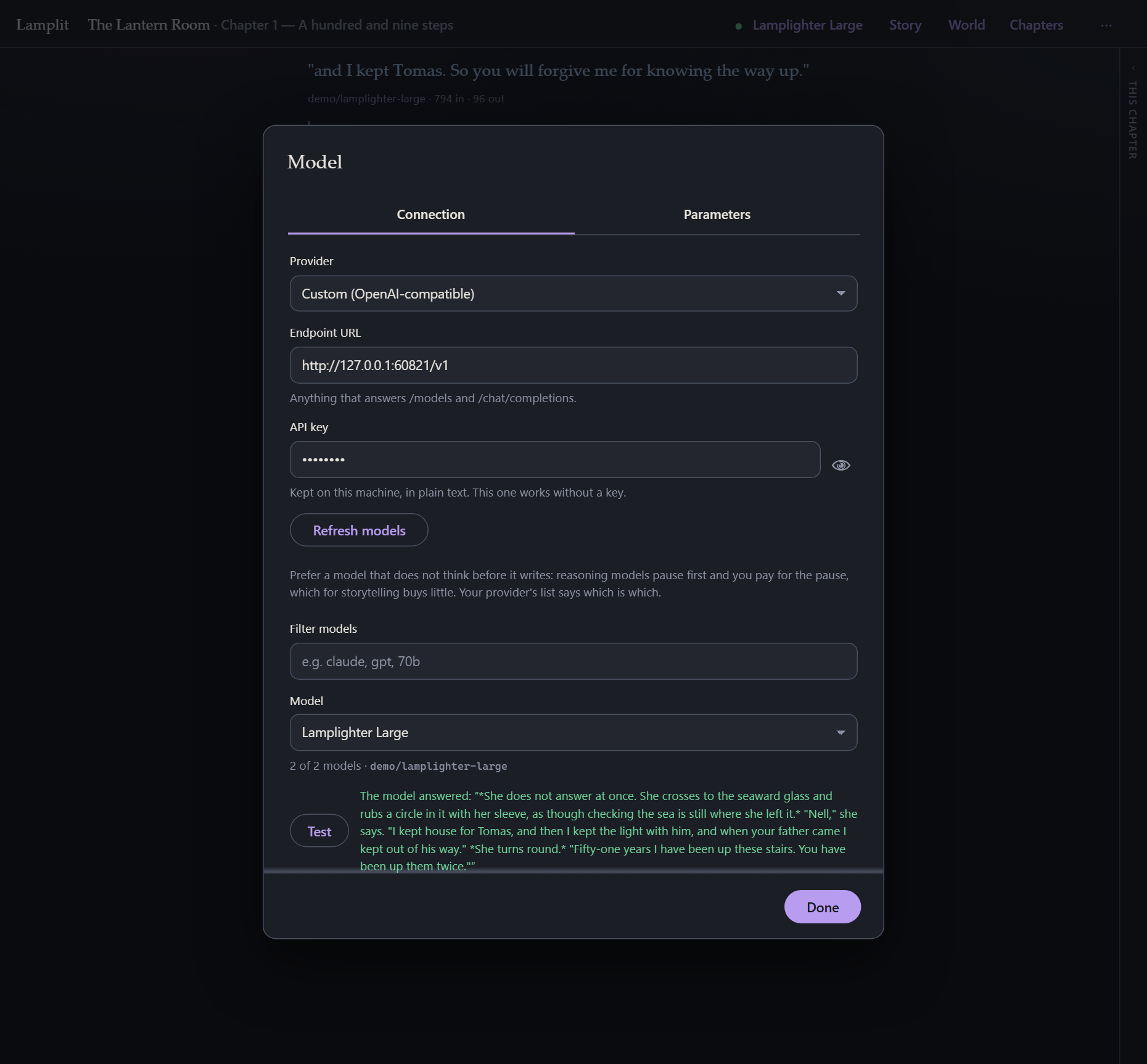
| Provider | Pick one and the URL fills itself in, with a link to the page where that provider hands out keys. Custom lets you type any URL that answers GET /models and POST /chat/completions in OpenAI’s shape. The full list is below. |
| Endpoint URL | Ends at /v1 (or wherever your server puts those two paths). |
| API key | Sent as Authorization: Bearer …. Leave it empty for a local server that does not want one. |
| Fetch models | Reads the endpoint’s own list. Filter it, then pick one. |
| Model | Prefer one that does not think before it writes. Reasoning models pause and then answer, and you pay for the pause as output tokens; for prose the wait buys little. Your provider’s list says which models reason and which of theirs write best — ask them, not the app. Lamplit never asks a model to reason on its own; whether a model reasons when not asked is the model’s default, and Reasoning effort under Advanced is the only thing that changes it. |
| Test | One real round trip. Worth doing once — it tells you whether the URL, the key and the model all work together, rather than making you find out mid-sentence. |
Every change is saved the moment you make it, so however you close this sheet, it has already been kept. On a fresh install the same form is the first thing on screen, without the tab strip and without a way past it until there is an endpoint and a model — see Getting started.
The browser talks to the model directly
There is no proxy and no SDK. Your key goes from your browser to your provider and nowhere else — in particular, not through the persistence server, which never sees it and has no idea a model exists.
The one consequence is CORS: your endpoint has to allow browser requests. Every provider in the list does — that is why they are in it. Most local servers do too, or have a flag for it. If a request fails with a network error but the URL is right, that is almost always what happened.
The providers in the list
Every one of these was checked from a browser on 2026-09-03 and allows the call: that is the
only thing that decides whether a provider can be in the list at all. npm run providers re-runs
the check and prints this table, so it can be brought up to date rather than trusted.
Aggregators — one key, many makers.
| URL | Where the key comes from | |
|---|---|---|
| OpenRouter | https://openrouter.ai/api/v1 |
openrouter.ai/keys |
| NanoGPT | https://nano-gpt.com/api/v1 |
nano-gpt.com/api |
| AIMLAPI | https://api.aimlapi.com/v1 |
aimlapi.com/app/keys |
| CometAPI | https://api.cometapi.com/v1 |
api.cometapi.com/console/token |
| ElectronHub | https://api.electronhub.ai/v1 |
playground.electronhub.ai |
| Chutes | https://llm.chutes.ai/v1 |
chutes.ai/app/api |
| Pollinations | https://gen.pollinations.ai/v1 |
free tier: no key needed |
Caching: OpenRouter and NanoGPT cache automatically on their OpenAI, Gemini and open-source routes, and take the explicit markers Lamplit sends for Claude models. This is the way to cache a Claude model — see What it costs to send it all again.
Hosted — the model’s own maker.
| URL | Where the key comes from | |
|---|---|---|
| OpenAI | https://api.openai.com/v1 |
platform.openai.com/api-keys |
| Anthropic | https://api.anthropic.com/v1 |
console.anthropic.com |
| Google Gemini | https://generativelanguage.googleapis.com/v1beta/openai |
aistudio.google.com/apikey |
| Mistral | https://api.mistral.ai/v1 |
console.mistral.ai/api-keys |
| DeepSeek | https://api.deepseek.com/v1 |
platform.deepseek.com |
| xAI (Grok) | https://api.x.ai/v1 |
console.x.ai |
| Groq | https://api.groq.com/openai/v1 |
console.groq.com/keys |
| Together | https://api.together.xyz/v1 |
api.together.xyz/settings/api-keys |
| Fireworks | https://api.fireworks.ai/inference/v1 |
fireworks.ai/account/api-keys |
| Cohere | https://api.cohere.ai/compatibility/v1 |
dashboard.cohere.com/api-keys |
| Moonshot (Kimi) | https://api.moonshot.ai/v1 |
platform.moonshot.ai |
| Z.ai (GLM) | https://api.z.ai/api/paas/v4 |
z.ai/manage-apikey/apikey-list |
| SiliconFlow | https://api.siliconflow.com/v1 |
cloud.siliconflow.com/account/ak |
| MiniMax | https://api.minimax.io/v1 |
platform.minimax.io |
| Perplexity | https://api.perplexity.ai |
perplexity.ai/settings/api |
Caching: OpenAI, DeepSeek, Google Gemini 2.5, xAI, Groq, Moonshot and Z.ai all cache a repeated prompt prefix without being asked, and report what they saved. Anthropic does not — see below. The rest say nothing about it either way.
Run locally — a model on this machine, no key and no bill.
| URL | |
|---|---|
| Ollama | http://localhost:11434/v1 |
| LM Studio | http://localhost:1234/v1 |
| llama.cpp server | http://localhost:8080/v1 |
| vLLM | http://localhost:8000/v1 |
| KoboldCpp | http://localhost:5001/v1 |
| TabbyAPI | http://localhost:5000/v1 |
| text-generation-webui | http://localhost:5000/v1 |
Caching: all of these reuse the prompt prefix they already have in memory, and none of them report it. The win there is how fast the reply starts, not the bill, since there is no bill.
Anything else OpenAI-compatible works too, under Custom; only streaming chat completions are used.
Three of these need one thing said about them:
- Anthropic only answers a browser when the request says the key is meant to be in one. It
does, always — this app has no server to hide a key on. Nothing to switch on. But note that
api.anthropic.com/v1is Anthropic’s OpenAI compatibility layer, and prompt caching is one of the things it does not support: a long chapter is re-read at full price on every turn. Reach the same Claude model through NanoGPT or OpenRouter and it caches normally. - Perplexity publishes no model list, so Lamplit carries its five, and there is no Fetch models button to press.
- SiliconFlow and MiniMax run separate hosts for mainland China (
api.siliconflow.cn,api.minimaxi.com). Use Custom with that URL.
Parameters
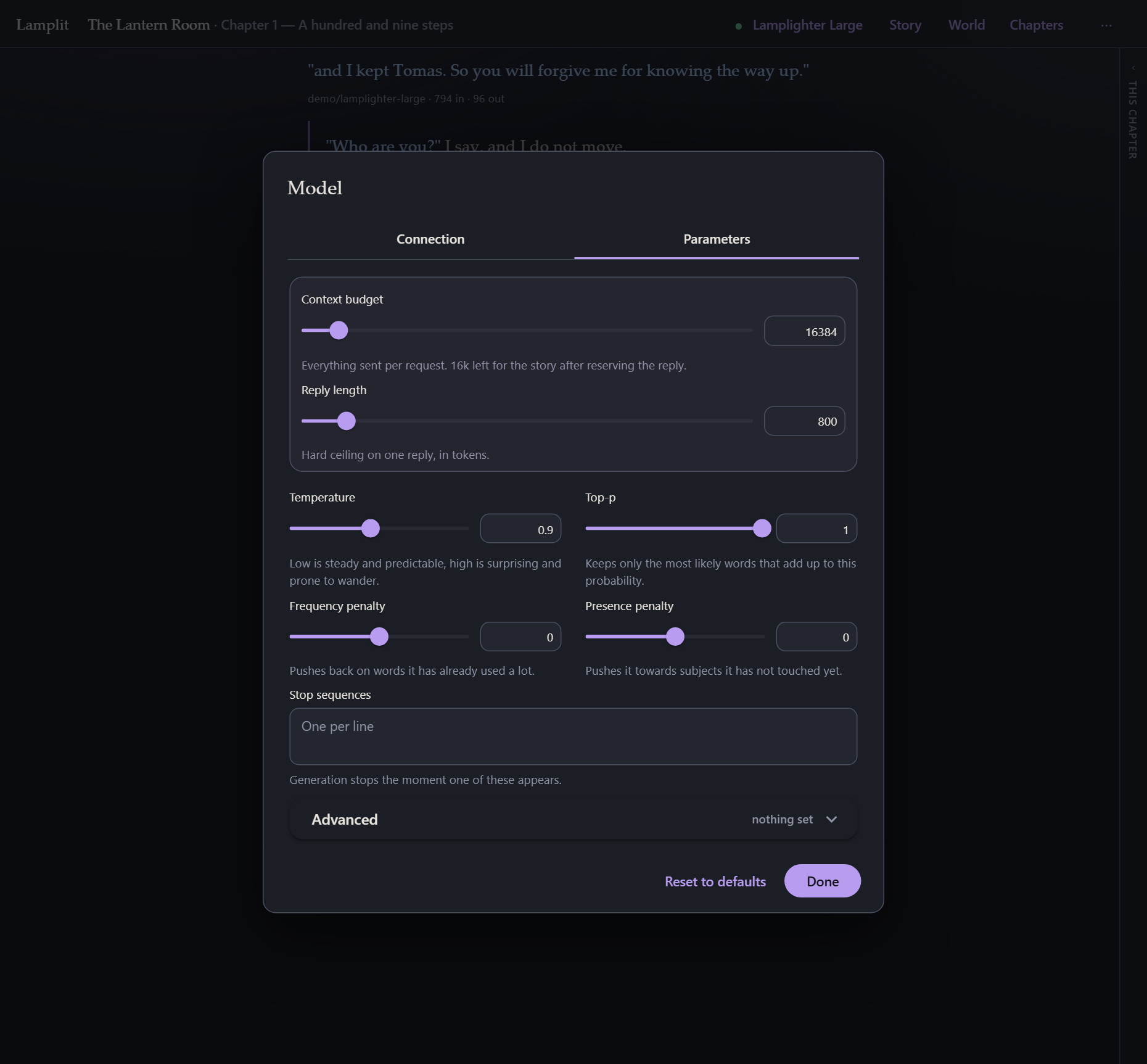
The second tab of the same sheet.
The two that matter most
- Context budget — everything sent per request, in tokens. The prompt builder trims the oldest messages to fit it. See The prompt.
- Reply length — a hard ceiling on one answer, in tokens. It is reserved out of the budget before trimming, which is why the hint under the budget says how much is left for the story.
The usual sampling set
| Temperature | Low is steady and predictable, high is surprising and prone to wander. |
| Top-p | Keeps only the most likely words that add up to this probability. |
| Frequency penalty | Pushes back on words it has already used a lot. |
| Presence penalty | Pushes it towards subjects it has not touched yet. |
| Stop sequences | Generation stops the moment one of these appears. |
Advanced
Behind the Advanced panel: top_k, min_p, repetition_penalty, top_a, seed and
reasoning_effort.
These are only sent once you switch them on. An endpoint that does not understand
repetition_penalty never sees the field, so turning one on for NanoGPT does not break the same
story pointed at something stricter later.
Reset to defaults puts the whole set back.
Parameters are global, not per story — they are how you like models to behave, and they live in
settings.jsonnext to your connection, which is why they are the tab beside it.
Reading the numbers
Under each answer (when Show token counts is on in Preferences → Reading) is the model
that wrote it and the turn’s real cost as the provider reported it: 612 in · 148 out.
A third number joins them when the provider reports one: 8.0k in · 240 out · 7.6k cached — how
much of the prompt it had already read and charged a fraction for. It is the only sign that the
prefix cache is working, and its absence on a second turn in the same chapter is
the sign that it is not.
With Developer mode on in Preferences → Advanced, the context pill under the composer is the estimate for what you are about to send. Comparing the two over a few turns tells you how far off the estimate is for your model, and whether your budget is where you want it.